All
Best Practices to Report a Bug
A practical guide to writing bug reports that save time, reduce back-and-forth and help your team ship fixes faster.
4 min

How to Report a Bug the right way.
A great bug report is the difference between a fix shipped in an hour and a week of back and forth. Here's how to write one that developers will actually love and act on.
Write a Clear, Specific Title
The title is the first thing a developer reads. A vague title like "Login Broken" provides zero context. A precise title surfaces the right person, the right component and the right priority, immediately.
Vague: Login broken on mobile
Specific: [iOS Safari 17] Login form submit hangs indefinitely when 2FA is enabled
Think: What broke? Where? Under what condition? If you can answer those three in the title, you are already ahead of 90% of bug reporters.
2. Describe Steps to Reproduce
Reproducibility is everything. If a developer can't reproduce the bug, they can't fix it. Write your steps so that a brand new team member, with no context, could follow them and hit the same problem.
Example steps to reproduce
1. Log in with a 2FA-enabled account
2. Navigate to Settings → Profile
3. Click "Update Email"
4. Enter a new email address and click Save
5. Observe: spinner appears and never resolves
Note:
Start from a known state (e.g. "logged out", "fresh session")
Number each step- don't write paragraphs
Be literal: include the exact text you clicked or typed
Note any prerequisite state (account type, feature flag, etc.)
3. State Expected vs. Actual Behaviour
Never assume the developer knows what should happen. Spelling out the difference between expected and actual behaviour removes ambiguity and confirms whether you and the developer share the same mental model.
Expected: After clicking Save, a success notification appears and the new email is reflected in the profile header.
Actual: The spinner runs indefinitely. No notification. No network request visible in Dev tools. Page refresh shows the old email unchanged.
Pro tip: If you are not sure what "expected" is, check the product docs, design spec or ask a colleague first. Sometimes what you think is a bug is actually a known limitation.
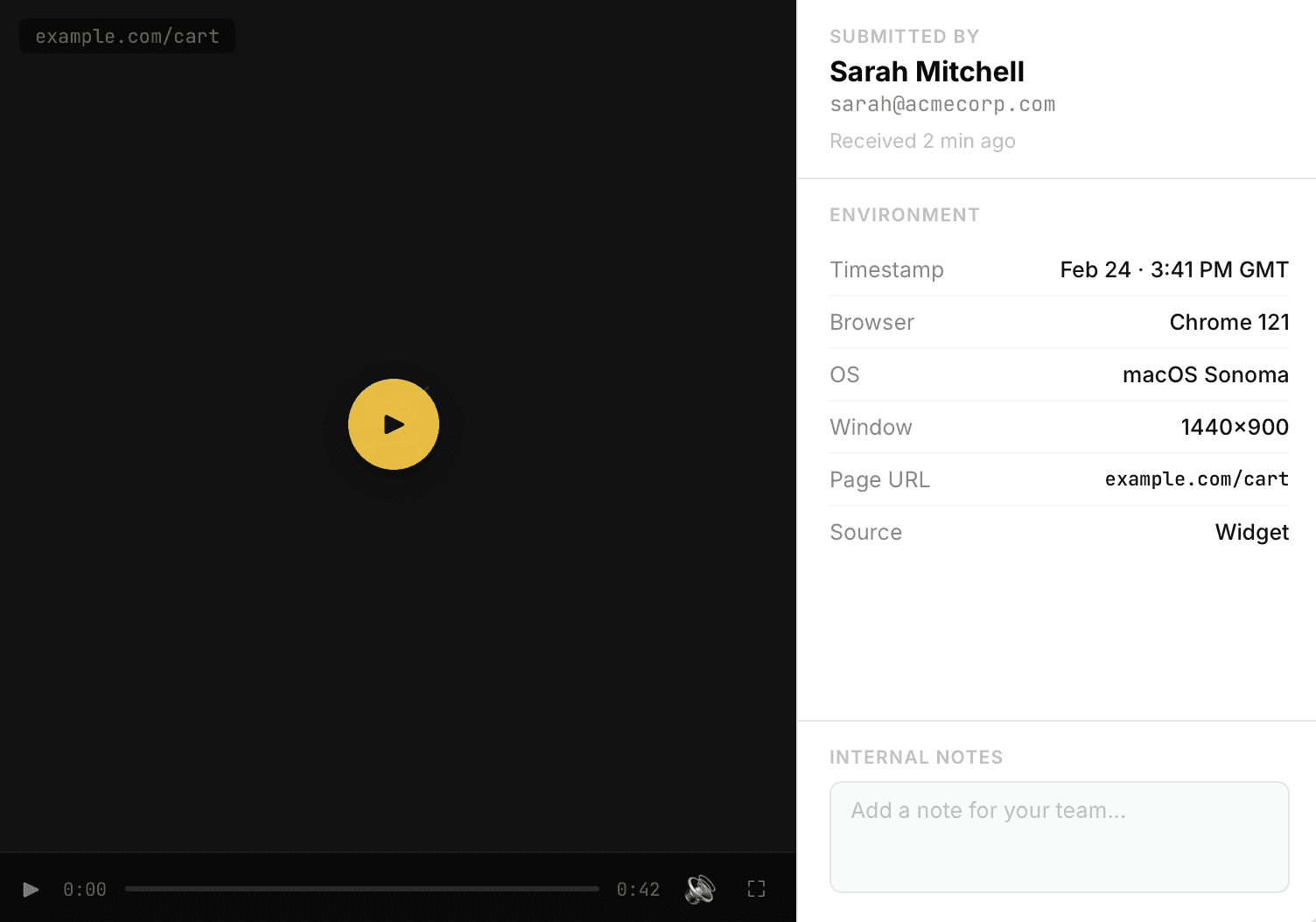
4. Include Your Environment Details
Bugs are often environment specific. A developer on Chrome/macOS might not be able to reproduce your Safari/iOS issue without knowing your setup. Always include:
Operating system and version (e.g. macOS 14.4, Windows 11)
Browser and version (e.g. Safari 17.3, Firefox 124)
App version or build number
Device type and model if relevant
Network conditions if potentially relevant (VPN, slow connection, etc.)
Account type or feature flags that might affect behaviour
If you are using Bugtrotter, note all of this is captured automatically.
5. Attach Screenshots, Videos & Logs
A picture is worth a thousand words. A screen recording is worth ten thousand. Visual evidence dramatically reduces the time a developer spends guessing what you saw.
Screenshot the exact error state - not a blank screen before the bug
Record a short video for timing-sensitive bugs - Bugtrotter has a built-in screen recorder so you can capture and attach footage without ever leaving the app.
Copy the full error message- not just "there was an error"
Attach browser console logs for front end issues
Include network request/response details for API issues (found in the 'Network' tab of DevTools)
Pro tip: Blur or crop out personal data, passwords and API keys before attaching anything to a bug report - especially in public trackers.
6. Assess Severity & Priority
Help your team triage faster by giving a realistic severity estimate. Most trackers use a scale like:
Critical: data loss, security vulnerability, complete outage with no workaround
High: core workflow broken, many users affected, workaround is painful
Medium: partial degradation, reasonable workaround exists
Low: cosmetic issue, edge case, minor UX friction
Also note how frequently it occurs: always, intermittently or once. Vague bugs are harder to fix - that context matters.
7. Check for Duplicates First
Before filing a new report, search your issue tracker. Duplicate reports fragment discussion and waste triage time. A quick 60 second search saves hours.
Search by keywords from the error message or component name
Check closed issues too - it may already be fixed in an upcoming release
If you find a duplicate, add a comment with your environment details rather than opening a new ticket
8. Stay Engaged After Filing
Your job doesn't end when you click Submit. Developers often have follow-up questions and a slow response can stall a fix by days.
Watch the issue for comments and respond within a working day
Test the fix when a patch is provided and confirm resolution or re-open with details
Close the ticket if you realise the issue was user error
Share any new information you discover along the way
The golden rule: write your bug report as if you are the developer who will read it at 9am on a Monday. Give them everything they need to understand, reproduce and fix the issue without sending a single follow-up message.
Good bug reports are a craft and like any craft, the right tools make all the difference. That's exactly why we built Bugtrotter: to make structured, clear reporting the default for every team, not just the disciplined ones. The more intentional you are about how you report, the faster your team ships fixes and the better your software gets.
View more articles
Learn actionable strategies, proven workflows, and tips from experts to help your product thrive.