All
A complete guide to SaaS customer support: Strategy, team structure, tools, metrics and how to resolve tickets faster with less back and forth.

•
•
Customer support in SaaS isn't what it used to be. The bar has moved. Customers expect faster responses, more knowledgeable agents and resolutions that actually stick, not workarounds and copy paste answers.
For support managers, that means more pressure with often the same or smaller teams. The companies getting this right are not just hiring faster, they are building smarter systems, capturing better information and closing the loop between support and product more effectively than their competitors.
This guide covers everything you need to build, run, and scale a SaaS customer support operation; from strategy and team structure to tools, metrics and how to stop the same tickets coming in twice.
1. What Is SaaS Customer Support and Why It's Different
SaaS customer support is not retail support with a different product. The nature of the product, software that updates constantly, that different users interact with in different ways, on different devices and browsers, creates a category of support problems that don't exist elsewhere.
A few things that make SaaS support uniquely challenging:
Bugs are inevitable and invisible until reported. Unlike a physical product where a defect is obvious, a software bug might only affect users on a specific browser, a specific plan or after a specific sequence of actions. Your support team is often the first to know something is broken, which means how they capture and communicate that information directly affects how fast it gets fixed.
Every customer uses the product differently. A bug that's critical for one customer might be irrelevant to another. Support teams have to triage not just by severity but by customer impact, plan tier and use case, often without much context to work with.
Support data is product data. In SaaS, every ticket is a signal. Patterns in your support queue tell you what's confusing, what's broken and what's missing. Teams that feed that information back to product move faster than those that treat support as a cost centre to be minimised.
2. Building a SaaS Support Strategy That Scales
Most growing-stage SaaS teams don't have a support strategy, they have a support inbox. Someone checks it, responds when they can and escalates to engineering when things get complicated. That works at five customers. It doesn't work at five hundred.
A strategy that scales has three components:
A clear tier structure. Not every ticket needs the same response. Tier 1 covers common questions that can be resolved with documentation or a short reply. Tier 2 covers account specific issues that need investigation. Tier 3 covers bugs and technical problems that require engineering involvement. Defining these tiers and who handles each, means tickets get to the right person faster without everything landing on your most senior team member.
A feedback loop to product. Support tickets are one of the richest sources of product insight available. Build a process, even a simple one, for tagging tickets by root cause and sharing patterns with your product team monthly. The fixes that come out of that process reduce future ticket volume directly.
Proactive communication built in. The best support interaction is the one that never happens because you got ahead of it. Scheduled maintenance, billing changes, known bugs; communicating these proactively before customers notice them removes a predictable chunk of inbound volume.
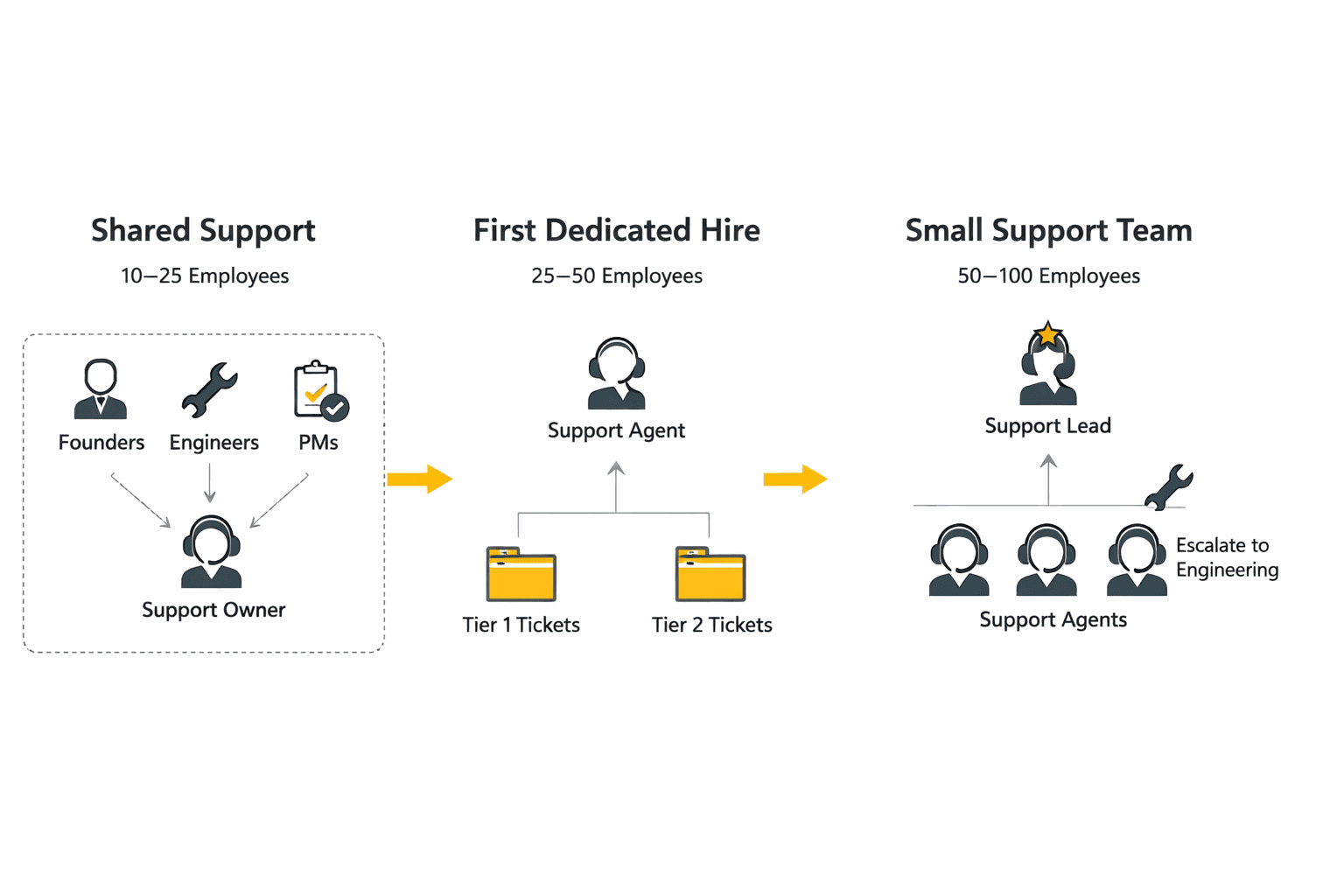
3. How to Structure a SaaS Customer Support Team at 10–100 Employees
Team structure should follow company stage. What works at 10 employees creates bottlenecks at 50 and breaks entirely at 100.
10–25 employees At this stage, support is usually shared across the team; founders, product managers and engineers all handle tickets alongside their primary roles. This is valuable because it keeps everyone close to customer problems. The risk is that nothing is owned so things fall through the gaps.
Assign one person as the support owner, even if it's not their full-time role. They set response time expectations, ensure nothing gets missed and are responsible for escalating bugs to engineering with enough context to act on.
25–50 employees This is typically when a dedicated support hire makes sense. Your first full-time support person should be someone who can handle Tier 1 and Tier 2 independently, document processes as they go and build the knowledge base that will deflect tickets as the team grows.
50–100 employees By this point you need a small team with defined roles, at minimum a support lead, a handful of agents and a clear escalation path to engineering. This is also where the cost of bad processes becomes visible. Teams without structured handoffs between support and engineering spend significant time on back and forth that could be eliminated with better tooling and clearer templates.
4. Scaling Support as You Grow
Scaling support doesn't mean scaling headcount proportionally. The best support teams grow their capacity faster than their team size by investing in the right places.
Documentation compounds. Every article you write today deflects tickets for years. Prioritize documenting your top ten ticket drivers before you hire your next support agent, the deflection rate often makes more of a difference than an additional person.
Tooling has leverage. The right tools don't just make individual agents faster, they change what's possible at scale. A support team using structured bug reporting captures better information in less time than one relying on free text descriptions, regardless of how experienced the agents are.
Specialisation emerges naturally. As your team grows, some agents will develop deeper knowledge of specific product areas or customer segments. Let that happen. A specialist who can resolve Tier 2 tickets without escalation is worth more than a generalist who escalates everything.
5. The Tools Every SaaS Support Team Needs
The modern SaaS customer support stack has a few non-negotiables and a growing set of tools that separate high-performing teams from average ones.
Helpdesk — Zendesk or Intercom Your helpdesk is the centre of gravity for everything else. Zendesk is the enterprise standard; powerful, deeply configurable and integrates with almost everything. Intercom is increasingly popular with product-led SaaS teams because it lives inside the product rather than in a separate inbox. Both are solid choices depending on your motion.
Issue tracking with Jira: For bug escalation and engineering handoffs, Jira remains the standard. The quality of what goes into Jira directly affects how fast bugs get fixed. A well structured ticket with reproduction steps, environment details and a clear description of expected versus actual behaviour gets resolved faster than a unclear one, every time.
Team communication with Slack: Your support team lives in Slack. Bug escalations, customer context, quick questions to engineering, Slack is where real time communication happens. Bugtrotter integrates directly with Slack so bug reports and technical context land where your team is already working.
Process documentation with Notion: SaaS support teams that scale well document everything, escalation paths, response templates, known bugs, onboarding guides for new agents. Notion is where most teams do this. It's searchable, collaborative and easy to keep current.
Screen recording with Loom: Many SaaS teams currently use Loom to record customer issues manually, copying links into Jira or Slack tickets. It works but it captures zero technical context automatically. The video exists but the information an engineer actually needs to reproduce the bug or support agent needs to understand the bug still has to be collected separately.
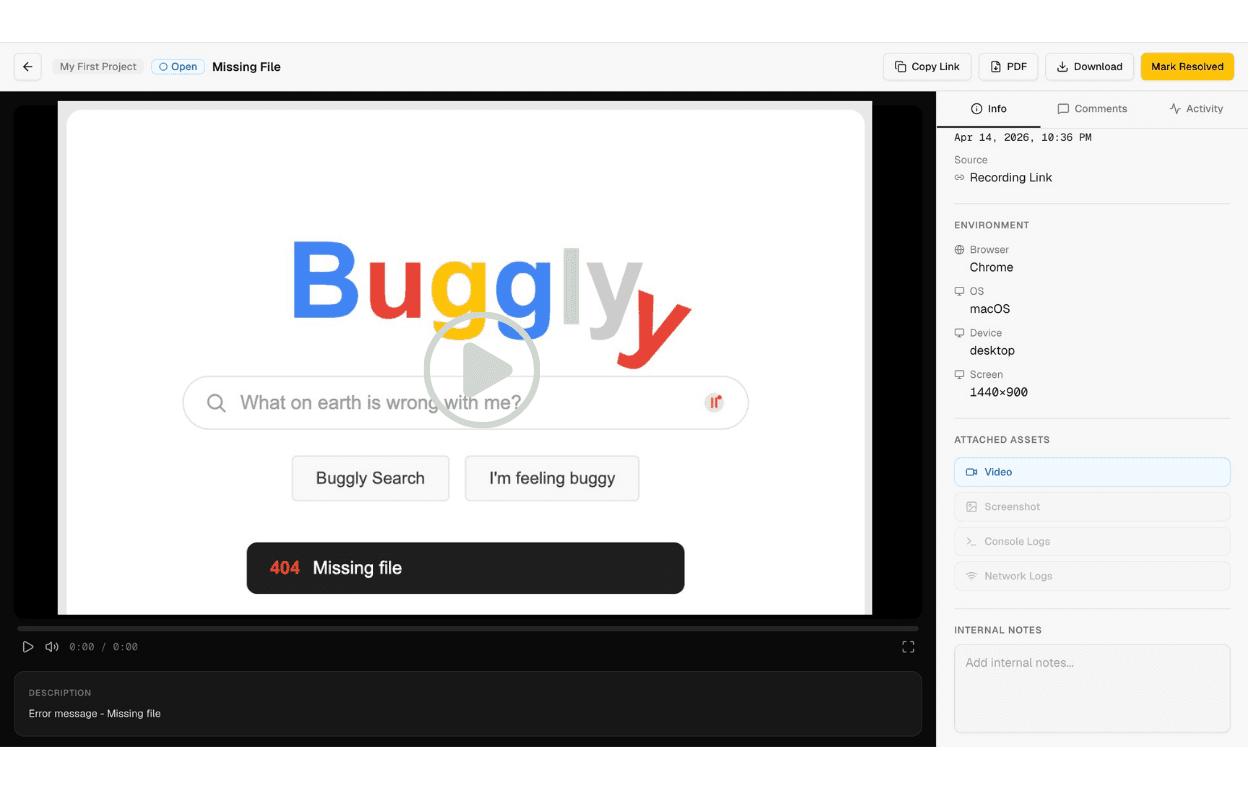
Bug reporting with Bugtrotter: Bugtrotter is purpose built for what Loom workarounds are trying to solve. Customers record a short video of the issue happening in real time and the report that lands in your helpdesk or Jira automatically includes the technical context your team needs: device information, browser etc. No follow up questions needed.
Support teams using Bugtrotter report that bug tickets are significantly clearer than those submitted via text. The average time saved is more than 30 minutes per ticket.
Linear integration is coming: for teams using Linear as their issue tracker, Bugtrotter will fit directly into that workflow too.
6. Key Metrics to Track
Metrics tell you where your SaaS customer support operation is healthy and where it's leaking. These are the ones that matter most for SaaS teams.
First Reply Time (FRT) How long between a ticket being submitted and your first response. According to a SuperOffice study, 46% of customers expect a response in under 4 hours, yet the average response time is over 12 hours. (Source: Getmonetizely )
Time to Resolution (TTR) How long from ticket open to ticket closed. This is where bug report quality has the biggest impact, incomplete reports that require multiple follow up exchanges before work can even begin inflate TTR significantly. When we were building Warmcal, our support team averaged 3 follow-up messages per bug report just trying to gather enough information to act. That's time on both sides that adds up fast.
Customer Satisfaction Score (CSAT) A post-resolution survey asking customers how satisfied they were. CSAT captures what TTR doesn't, a fast resolution that doesn't actually solve the problem will score poorly. Track it per agent and per ticket category to find patterns.
Ticket Volume by Category Raw volume matters less than what's driving it. Categorise every ticket by root cause, billing, bug, how to, onboarding, other and track the breakdown monthly. Shifts in category distribution tell you whether your product is getting more stable or less, and where your documentation is failing.
First Contact Resolution (FCR) The percentage of tickets resolved without requiring a follow-up from the customer. High FCR means your team is getting it right the first time. Low FCR often points to incomplete information at the point of submission which is a tooling and process problem, not an agent quality problem.
7. How to Reduce Support Ticket Volume
The most sustainable way to reduce ticket volume is to fix the underlying reasons customers are reaching out in the first place. That means looking at your ticket categories and addressing the root cause of each.
The highest-leverage actions are typically:
Fix high-volume bugs faster. A single unresolved bug can generate dozens of duplicate tickets. The faster bugs move from report to fix, the less volume they generate. This is directly tied to the quality of information in the initial report, clearer reports mean faster fixes mean fewer follow-on tickets.
Build a help centre that matches how customers search. Write articles around the exact language customers use in tickets, not the language your team uses internally. "Why was I charged twice" deflects more tickets than "understanding your billing cycle."
Communicate proactively. Known bugs, upcoming billing dates, scheduled maintenance, if you tell customers before they notice, the ticket never gets filed.
For a full breakdown of how to reduce support ticket volume across every category, read our guide: How to Reduce Support Tickets Without Sacrificing Customer Experience.
8. How to Capture Customer Issues With Full Context
This is where most SaaS customer support operations quietly lose hours every day not in the resolution but in the chase for information that should have been there from the start.
The typical bug reporting cycle looks like this: a customer sends a message saying something is broken. The support agent asks for their browser. The customer replies. The agent asks for their OS. The customer replies. The agent asks them to describe what they were doing when it happened. By the time there's enough context to escalate to engineering, three days have passed and the customer has sent five messages.
When we experienced this firsthand at Warmcal, our team was averaging 3 follow-up messages per bug report before we had enough to act. Multiply that across your ticket volume and it becomes one of the biggest drains on support capacity that most teams never explicitly measure.
The fix isn't a better template. It's capturing context at the point of reporting.
Bugtrotter lets customers record exactly what went wrong, a short video of the issue happening in real time, with metadata captured automatically in the background. The report that lands in your helpdesk has everything your team needs to act immediately.
"We stopped asking customers for screenshots. Now, when a bug is reported, we just watch the video and check the logs. We are fixing things in hours instead of days because we finally have the full story from the start." — Hannah, Customer Support Manager
Teams using Bugtrotter resolve tickets are significantly faster not because their engineers got faster but because the information was there from the first message.
9. Common Mistakes SaaS Customer Support Teams Make
Treating all tickets as equal urgency. A billing bug affecting a paying customer and a UI misalignment on a rarely used settings page are not the same priority. Without a triage process, everything feels urgent and nothing gets the attention it deserves.
Not closing the loop with product. Support teams that don't share ticket patterns with product are solving the same problems over and over. A monthly summary of top ticket drivers sent to your product team is one of the highest-leverage habits a support manager can build.
Relying on text descriptions for bug reports. Written descriptions of software bugs are inherently limited. Customers don't know what information engineers need and engineers can't reproduce bugs from vague descriptions. Teams that rely on text only bug reports spend more time on back and forth and resolve bugs more slowly than those with structured, context rich reporting.
Building a help centre and forgetting about it. Documentation goes stale. A help article that was accurate six months ago might describe a UI that no longer exists. Set a recurring review, monthly or quarterly to update articles based on current ticket patterns.
Measuring response time but not resolution quality. A fast reply that doesn't solve the problem isn't good support. First Contact Resolution and CSAT together tell you whether you're actually resolving issues, not just acknowledging them quickly.
10. The Bottom Line
SaaS customer support done well is a competitive advantage. Customers who get fast, clear, competent support stay longer, expand more and refer others. Teams that treat support as a cost to minimize miss that entirely.
The teams getting this right share a few things in common, they capture better information upfront, they close the loop with product consistently and they invest in tooling that gives their agents leverage rather than just more work.
"No more asking users for their browser or URL. I just get the video and the info I need to fix it. Huge time saver." — Sarah G., Founder
View more articles
Learn actionable strategies, proven workflows, and tips from experts to help your product thrive.