
BUGTROTTER FOR CUSTOMER SUPPORT
Customer Bug Reports. Resolved in Minutes.
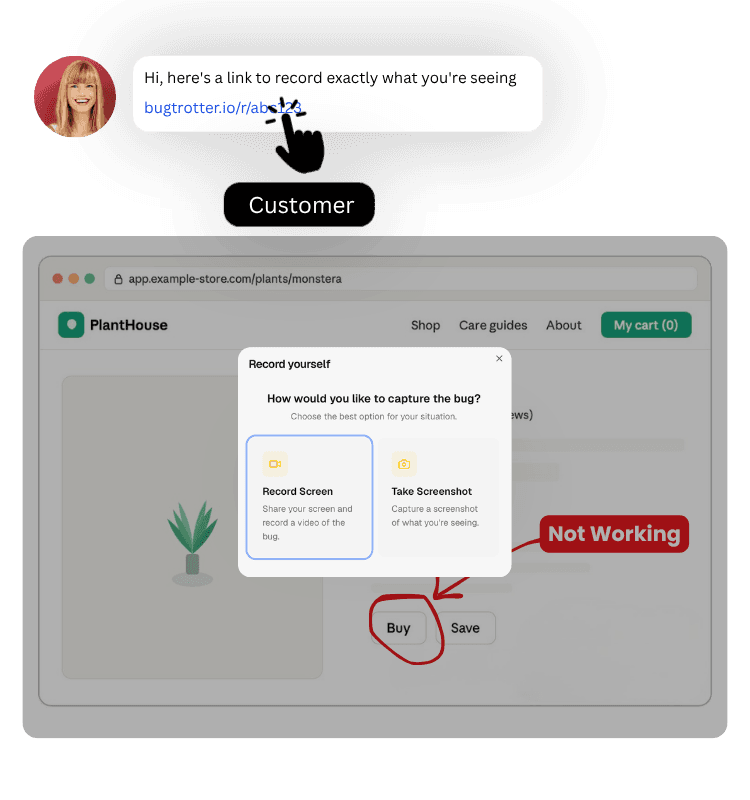
Customer records their screen. Full report lands in your dashboard instantly — video, browser, OS, URL, console logs. No chasing tickets. No guessing.
14 day free trial · No credit card required · Setup in 2 min





Built For Customer Support
BUGTROTTER FOR CUSTOMER SUPPORT
Customer Bug Reports. Resolved in Minutes.
Customer records their screen. Full report lands in your dashboard instantly — video, browser, OS, URL, console logs. No chasing tickets. No guessing.
14 day free trial · No credit card required · Setup in 2 min
Built For Customer Support
BUGTROTTER FOR CUSTOMER SUPPORT
Customer Bug Reports. Resolved in Minutes.
Customer records their screen. Full report lands in your dashboard instantly — video, browser, OS, URL, console logs. No chasing tickets. No guessing.
14 day free trial · No credit card required · Setup in 2 min
Built For Customer Support
BEFORE & AFTER
Same customer issue. Completely different experience.
See what changes when your customer can just show you instead of trying to explain.
Without Bugtrotter
Support tickets arrive unclear
You ask for a screen recording
"how do I do that?"
You send long instructions.
Receive video hours later
Video doesn't play.
You spend more time showing them.
Thread grows. Ticket stays open.
With Bugtrotter
"Here's a magic link to record your screen"
Customer records video in one click
Report lands straight in your Slack channel
You watch and see the exact issue
Solve it in one reply
Save 30+ minutes per customer support ticket.
See exactly what your customers see to resolve issues faster.
BEFORE & AFTER
Same customer issue. Completely different experience.
See what changes when your customer can just show you instead of trying to explain.
Without Bugtrotter
Support tickets arrive unclear
You ask for a screen recording
"how do I do that?"
You send long instructions.
Receive video hours later
Video doesn't play.
You spend more time showing them.
Thread grows. Ticket stays open.
With Bugtrotter
"Here's a magic link to record your screen"
Customer records video in one click
Report lands straight in your Slack channel
You watch and see the exact issue
Solve it in one reply
Save 30+ minutes per customer support ticket.
See exactly what your customers see to resolve issues faster.
BEFORE & AFTER
Same customer issue. Completely different experience.
See what changes when your customer can just show you instead of trying to explain.
Without Bugtrotter
Support tickets arrive unclear
You ask for a screen recording
"how do I do that?"
You send long instructions.
Receive video hours later
Video doesn't play.
You spend more time showing them.
Thread grows. Ticket stays open.
With Bugtrotter
"Here's a magic link to record your screen"
Customer records video in one click
Report lands straight in your Slack channel
You watch and see the exact issue
Solve it in one reply
Save 30+ minutes per customer support ticket.
See exactly what your customers see to resolve issues faster.
HOW DOES IT WORK
Set Up Your Workspace
Create your Bugtrotter account and set up your first project in minutes. Connect to your favourite customer support tools or manage everything in your dashboard.
Collect Customer Bug Reports
Hit Catch a Bug in your dashboard. A magic link is generated. Drop it in your support chat, one line is all you need. Or embed the widget directly in your app.
Resolve Issues Faster
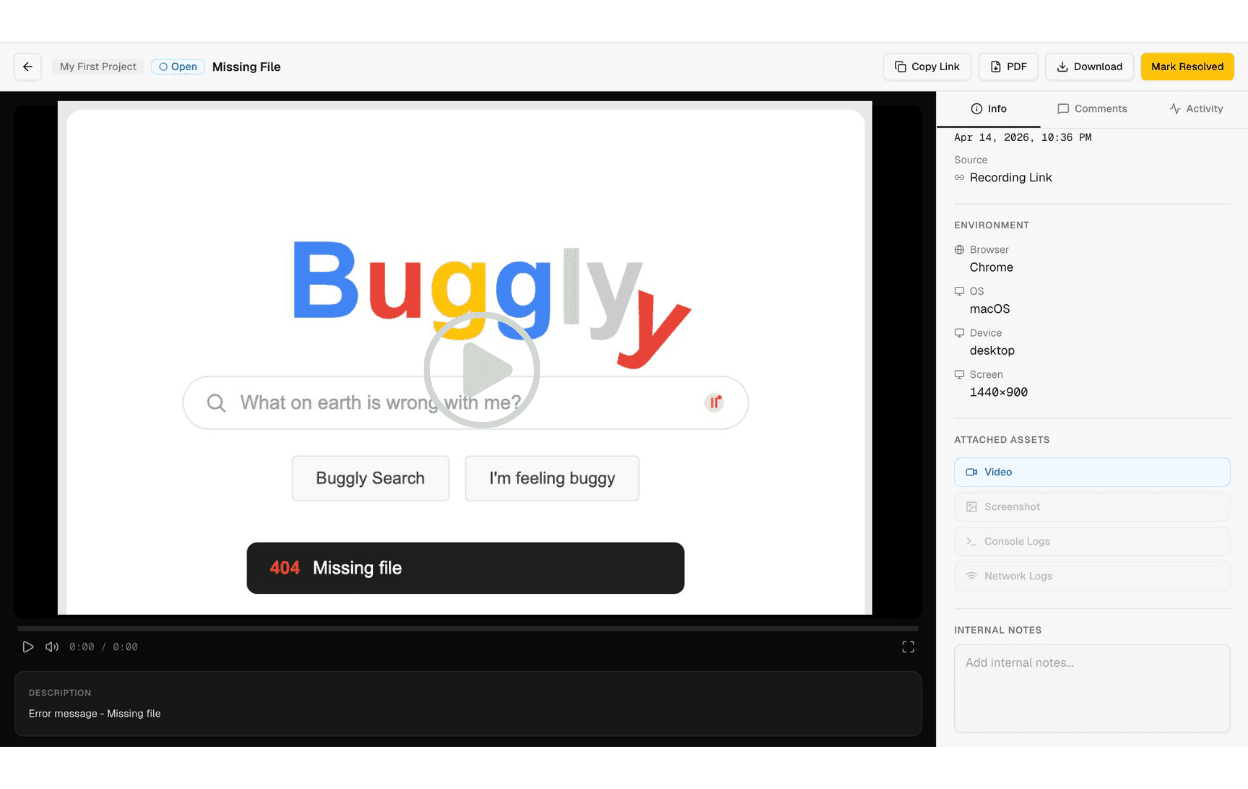
The full report lands in your dashboard instantly. Watch the video, see the context, fix the issue. Everything in one place without a single follow-up question.
Resolve Issues Faster
The full report lands in your dashboard instantly. Watch the video, see the context, fix the issue. Everything in one place without a single follow-up question.
HOW DOES IT WORK
Set Up Your Workspace
Create your Bugtrotter account and set up your first project in minutes. Connect to your favourite customer support tools or manage everything in your dashboard.
Collect Customer Bug Reports
Hit Catch a Bug in your dashboard. A magic link is generated. Drop it in your support chat, one line is all you need. Or embed the widget directly in your app.
Resolve Issues Faster
The full report lands in your dashboard instantly. Watch the video, see the context, fix the issue. Everything in one place without a single follow-up question.
Resolve Issues Faster
The full report lands in your dashboard instantly. Watch the video, see the context, fix the issue. Everything in one place without a single follow-up question.
HOW DOES IT WORK
Set Up Your Workspace
Create your Bugtrotter account and set up your first project in minutes. Connect to your favourite customer support tools or manage everything in your dashboard.
Collect Customer Bug Reports
Hit Catch a Bug in your dashboard. A magic link is generated. Drop it in your support chat, one line is all you need. Or embed the widget directly in your app.
Resolve Issues Faster
The full report lands in your dashboard instantly. Watch the video, see the context, fix the issue. Everything in one place without a single follow-up question.
Resolve Issues Faster
The full report lands in your dashboard instantly. Watch the video, see the context, fix the issue. Everything in one place without a single follow-up question.
FEATURES
Works Wherever You Work.

Zero friction for customers
Customers click a link and record in seconds. No download. No account. Nothing to figure out.

Auto Technical Data
Browser, OS, URL, screen size and console logs captured automatically with every report. Everything you need without asking.

In App Recording
Embed the widget directly in your app. Customers record without ever leaving your product.

Team Collaboration
Invite your whole team to Bugtrotter. Each member can collect recordings, manage reports and collaborate on issues in real time.

Push Through With One Click
Forward the complete report to your developer or push to Jira, Linear or Intercom with one click. They get the video, context, everything.

Multiple Projects
Create separate projects for different products, teams or customers. Each project has its own reports, links and Linear project — everything organised in one place.
FEATURES
Works Wherever You Work.
Zero friction for customers
Customers click a link and record in seconds. No download. No account. Nothing to figure out.
Auto Technical Data
Browser, OS, URL, screen size and console logs captured automatically with every report. Everything you need without asking.
In App Recording
Embed the widget directly in your app. Customers record without ever leaving your product.
Team Collaboration
Invite your whole team to Bugtrotter. Each member can collect recordings, manage reports and collaborate on issues in real time.
Push Through With One Click
Forward the complete report to your developer or push to Jira, Linear or Intercom with one click. They get the video, context, everything.
Multiple Projects
Create separate projects for different products, teams or customers. Each project has its own reports, links and Linear project — everything organised in one place.
FEATURES
Works Wherever You Work.
Zero friction for customers
Customers click a link and record in seconds. No download. No account. Nothing to figure out.
Auto Technical Data
Browser, OS, URL, screen size and console logs captured automatically with every report. Everything you need without asking.
In App Recording
Embed the widget directly in your app. Customers record without ever leaving your product.
Team Collaboration
Invite your whole team to Bugtrotter. Each member can collect recordings, manage reports and collaborate on issues in real time.
Push Through With One Click
Forward the complete report to your developer or push to Jira, Linear or Intercom with one click. They get the video, context, everything.
Multiple Projects
Create separate projects for different products, teams or customers. Each project has its own reports, links and Linear project — everything organised in one place.
SEE IT IN ACTION
SEE IT IN ACTION
SEE IT IN ACTION
TESTIMONIALS
What our users have to say about us

Radhe Agarwal

Great tool, I am glad I found it. Customer service is unbelievable, I didn’t see any business who are willing to help so much. Highly recommended!
Apr 19, 2026

Professional headshot of bugtrotter customer
Slack integration and no per seat pricing. Finally a support tool built for small teams that actually moves fast.
Apr 7, 2026

Marcus L
My customers used to send paragraphs trying to explain what was broken. Now they just record it. I see the issue in 30 seconds and fix it. Feels like a game changer for a small support team.
Mar 14, 2026

Stephen H
this product has completely changed my productivity and how much i can resolve so I can focus on building. cannot recommend it enough. thank you so much!
Mar 22, 2026

Sarah G
No more asking customers what browser they're on or what URL they were visiting. I get the video and everything I need in one place. It's cut my resolution time in half.
Apr 2, 2026

Donna Griffiths
I'm very happy that with Anwar we finally got Bugtrotter working for me! It's going to save me a lot of time in my business and so I was so grateful for his persistence to get the issues I was having figured out. I'm excited to use the product now. Blessings to the team.
Apr 20, 2026
TESTIMONIALS
What our users have to say about us
Radhe Agarwal
Great tool, I am glad I found it. Customer service is unbelievable, I didn’t see any business who are willing to help so much. Highly recommended!
Apr 19, 2026
Professional headshot of bugtrotter customer
Slack integration and no per seat pricing. Finally a support tool built for small teams that actually moves fast.
Apr 7, 2026
Marcus L
My customers used to send paragraphs trying to explain what was broken. Now they just record it. I see the issue in 30 seconds and fix it. Feels like a game changer for a small support team.
Mar 14, 2026
Stephen H
this product has completely changed my productivity and how much i can resolve so I can focus on building. cannot recommend it enough. thank you so much!
Mar 22, 2026
Sarah G
No more asking customers what browser they're on or what URL they were visiting. I get the video and everything I need in one place. It's cut my resolution time in half.
Apr 2, 2026
Donna Griffiths
I'm very happy that with Anwar we finally got Bugtrotter working for me! It's going to save me a lot of time in my business and so I was so grateful for his persistence to get the issues I was having figured out. I'm excited to use the product now. Blessings to the team.
Apr 20, 2026
FREQUENTLY ASKED QUESTIONS
Does the customer need to download anything?
└ No. Customers click a link or use the embedded widget and record directly in their browser. Nothing to download, nothing to install.
Can my whole team see the reports?
└ Yes. Any team member in your connected Linear project sees every report the moment it lands. You can also manage and share reports inside the Bugtrotter dashboard.
Do customers need a Bugtrotter account to report?
└ No. Customers don't need to signup to Bugtrotter. They just click a link and record. That's it.
What technical data is captured automatically?
└ Every report includes video, browser type and version, operating system, screen size and URL. Console logs and network requests are captured when using the embedded widget.
Does it work with our existing support tool?
└ Yes. Bugtrotter integrates with Slack, Intercom, Jira and more. If your tool isn't on the list yet, request an integration and we will add it.
How much does Bugtrotter cost?
└ One flat price for your entire team — no per-seat fees. Start with a 14-day free trial, no credit card required.
FREQUENTLY ASKED QUESTIONS
Does the customer need to download anything?
└ No. Customers click a link or use the embedded widget and record directly in their browser. Nothing to download, nothing to install.
Can my whole team see the reports?
└ Yes. Any team member in your connected Linear project sees every report the moment it lands. You can also manage and share reports inside the Bugtrotter dashboard.
Do customers need a Bugtrotter account to report?
└ No. Customers don't need to signup to Bugtrotter. They just click a link and record. That's it.
What technical data is captured automatically?
└ Every report includes video, browser type and version, operating system, screen size and URL. Console logs and network requests are captured when using the embedded widget.
Does it work with our existing support tool?
└ Yes. Bugtrotter integrates with Slack, Intercom, Jira and more. If your tool isn't on the list yet, request an integration and we will add it.
How much does Bugtrotter cost?
└ One flat price for your entire team — no per-seat fees. Start with a 14-day free trial, no credit card required.
FREQUENTLY ASKED QUESTIONS
Does the customer need to download anything?
└ No. Customers click a link or use the embedded widget and record directly in their browser. Nothing to download, nothing to install.
Can my whole team see the reports?
└ Yes. Any team member in your connected Linear project sees every report the moment it lands. You can also manage and share reports inside the Bugtrotter dashboard.
Do customers need a Bugtrotter account to report?
└ No. Customers don't need to signup to Bugtrotter. They just click a link and record. That's it.
What technical data is captured automatically?
└ Every report includes video, browser type and version, operating system, screen size and URL. Console logs and network requests are captured when using the embedded widget.
Does it work with our existing support tool?
└ Yes. Bugtrotter integrates with Slack, Intercom, Jira and more. If your tool isn't on the list yet, request an integration and we will add it.
How much does Bugtrotter cost?
└ One flat price for your entire team — no per-seat fees. Start with a 14-day free trial, no credit card required.