
Customer Support
Learn how support teams turn customer complaints into structured bug reports engineers can act on fast. Includes templates, patterns and screen recording tips.

•
•
Most support teams treat customer complaints and bug reports as two separate things. Complaints go to support. Bug reports go to engineering.
But the most valuable bug reports your team will ever receive often arrive disguised as complaints.
“This is unusable.” “I cannot believe this is still broken.” “I am switching to your competitor.”
Behind each of these messages is usually a real issue in your product. The customer is not filing a structured ticket. They are frustrated. But the signal you need is still ther, if you know how to extract it.
The support teams that fix bugs fastest are not always the ones with the best developers. They are the ones that know how to turn a frustrated customer message into an actionable bug report engineering can act on immediately.
Why Customer Complaints Are Bug Reports in Disguise
Think about the last customer complaint that came into your support inbox. Something like:
“Your product keeps crashing and I lost two hours of work.”
That one sentence contains more than it first appears.
“Keeps crashing” tells you the issue is recurring, not isolated. Recurring issues are usually higher priority than one-time glitches.
“I lost two hours of work” tells you the impact is high. This may involve data loss, failed saving or a broken core workflow.
“Your product” tells you the customer believes this is on your side, not theirs. They have already ruled out user error.
Every customer complaint contains clues like these. The skill is learning to read them without getting distracted by the emotion on the surface.
The Cost of Not Converting Complaints Into Bug Reports
When a customer complaint is not converted into a structured bug report, one of three things usually happens:
The support agent apologises, the customer feels slightly better and the issue never gets resolved. Weeks later, another customer hits the same bug and the cycle starts again.
The agent escalates the raw complaint to engineering with no context. The developer reads “it keeps crashing” and has no idea where to start. They ask support for more info. Support asks the customer. The customer has moved on. The ticket stalls.
The complaint is closed as resolved when the customer stops replying, even though the bug is still in the product. More users hit it. More complaints arrive. Nothing improves.
This is why support teams need a better system for turning vague frustration into structured bug reports. The complaint itself is not the problem. The lack of translation is.
How to Extract a Bug Report From a Complaint
The mistake many support agents make is asking too many technical questions too soon: browser version, OS, exact steps, console log, all in one message.
That approach can make a frustrated customer feel like they are being interrogated instead of helped.
A better method is simpler: start with empathy, then ask one focused question.
Acknowledge the issue first:
“That sounds really frustrating, losing work is the worst.”
Ask one question:
“Can you tell me what you were doing right before it crashed?”
One question is enough to move the conversation forward.
If the customer says they were saving a document, you now know the issue is in the save flow. Your next question becomes:
“What happened on the screen when you hit save?”
By the time you have asked three good questions:
What they were doing
What they saw
Whether it has happened before
… you usually have the core of a bug report.
Browser and device details can come later, once the customer is already in problem solving mode instead of complaint mode.
Patterns Matter More Than Isolated Tickets
One customer complaint is a data point. Three complaints about the same thing in the same week are a pattern.
The support teams that help engineering most effectively are not just good at handling individual tickets. They are good at spotting patterns across tickets and escalating the pattern, not just the single report.
If four customers mention something breaking during checkout in the same month, that is not four separate issues. That is one product problem showing up four times.
When engineering sees “four customers affected in the last 30 days” they understand the urgency much faster than from one vague complaint.
That is why ticket tagging matters. Tag by root cause where possible:
billing
onboarding
export
save function
checkout
login
At the end of each week, look for clusters. The clusters usually point to the real product issues.
This is what turns support from a reactive function into a feedback loop that improves the product.
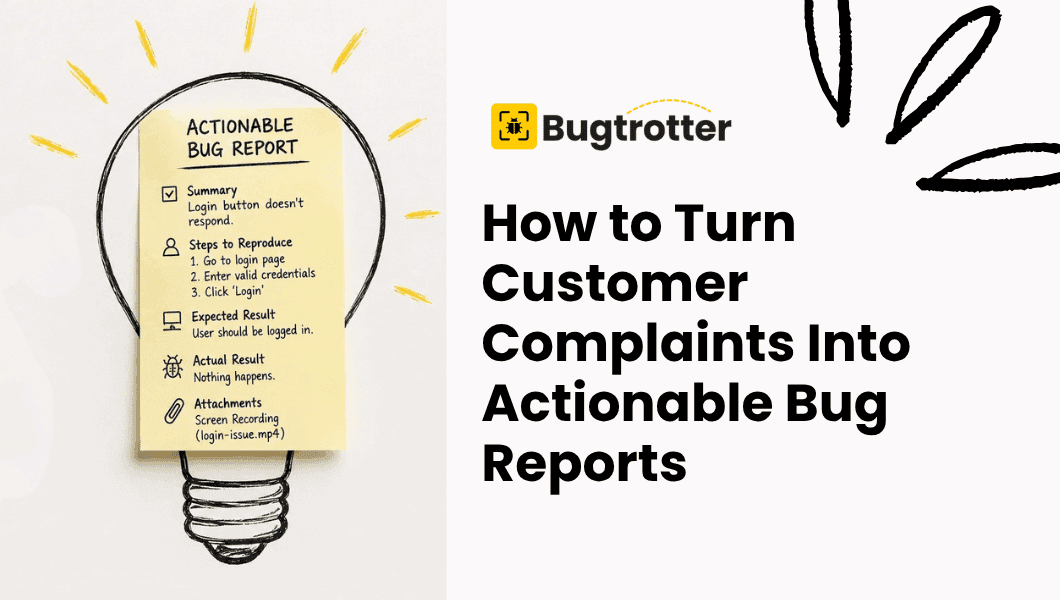
What an Actionable Bug Report Looks Like (Template)
Here is the difference between a customer complaint and a useful bug report.
Complaint:
“Your app crashed again and I lost everything I was working on. This is the third time this week. I’m done.”
Actionable bug report:
Summary: App crashes during document save for repeat users, third occurrence reported by the same customer this week.
Steps to reproduce:
Open existing document.
Make edits.
Click save.
Expected behaviour: The document saves and a confirmation appears.
Actual behaviour: The app crashes. No confirmation appears. Work is lost.
Frequency: Three times in one week for this customer. Check for other reports in the same timeframe.
Environment: Chrome on Windows 11. Pro plan account since January.
Customer impact: High. Data loss reported. Customer threatening to cancel.
That version gives engineering something they can start on immediately. The original complaint does not.
Use Screen Recordings When Text Stops Being Enough
Some bugs are difficult to explain in writing. The customer knows something is wrong but they cannot describe it in a way that maps neatly to your product.
That is where a screen recording helps. Not a screenshot, a recording.
A customer who records the issue as it happens gives you more context in 30 seconds than ten email exchanges ever could.
Instead of asking them to find a separate screen recorder, manage a file, and upload it, make the process as simple as possible. A single link is ideal. They click, record what they are seeing, and submit.
Tools like Bugtrotter are built for this workflow:
Video of the bug
Browser context
OS details
Console logs
…all captured in one place, with no extra back-and-forth.
When support can see the issue instead of trying to reconstruct it from text, the path to resolution gets much shorter.
For a step by step guide, see: How to Get Customers to Record Their Screen for Support.
Close the Loop When the Bug Is Fixed
This step gets skipped too often in support teams.
Engineering fixes the bug. Support closes the ticket. The customer never hears anything.
That is a missed opportunity.
The customer who complained loudly enough to give you a useful bug report deserves to know the issue was fixed. Even a short message—
“We wanted to let you know the issue you reported last week has been resolved.”
—can change how they feel about your company.
It tells them their complaint was not just heard, but acted on. That can turn a frustrated user into a loyal one.
Closing the loop also builds trust inside the product experience. Customers remember when your team responds quickly and follows through.
Final Thoughts: Turn Complaints Into Product Improvements
Customer complaints are not just support noise. They are product intelligence arriving in the wrong format.
The best support teams know how to:
extract useful details from complaints
spot patterns across tickets
get structured bug reports to engineering quickly
That reduces repeat complaints, shortens resolution time and helps the product improve with every frustrated message that comes in.
The next customer complaint that lands in your inbox might already be a bug report. It just needs translating.
View more articles
Learn actionable strategies, proven workflows, and tips from experts to help your product thrive.