Customer Support
Learn how to build a customer support SOP for bug reports with standardized triage, escalation paths, severity levels, and customer communication templates.

•
•

Most support teams handle bug reports differently every time. A new agent joins and escalates everything. A senior agent leaves and takes all the unwritten knowledge with them. A critical bug sits unresolved for three days because nobody agreed on what “urgent” actually means.
Creating a customer support SOP for bug reports fixes all of this. Not because process is exciting but because inconsistency is expensive. Every time a bug report is handled differently, your team loses time, your customers lose patience and your developers lose the context they need to fix the issue fast.
This is how to build one that actually gets used.
What a Bug Report SOP Actually Is
A bug report SOP is a documented process that tells every person on your customer support team exactly what to do from the moment a bug is reported to the moment it is resolved and the customer is notified.
It is not a template. Templates are part of it but a template alone does not tell an agent:
when to escalate,
who to escalate to, or
what information to gather first.
A customer support SOP for bug reports covers all of that.
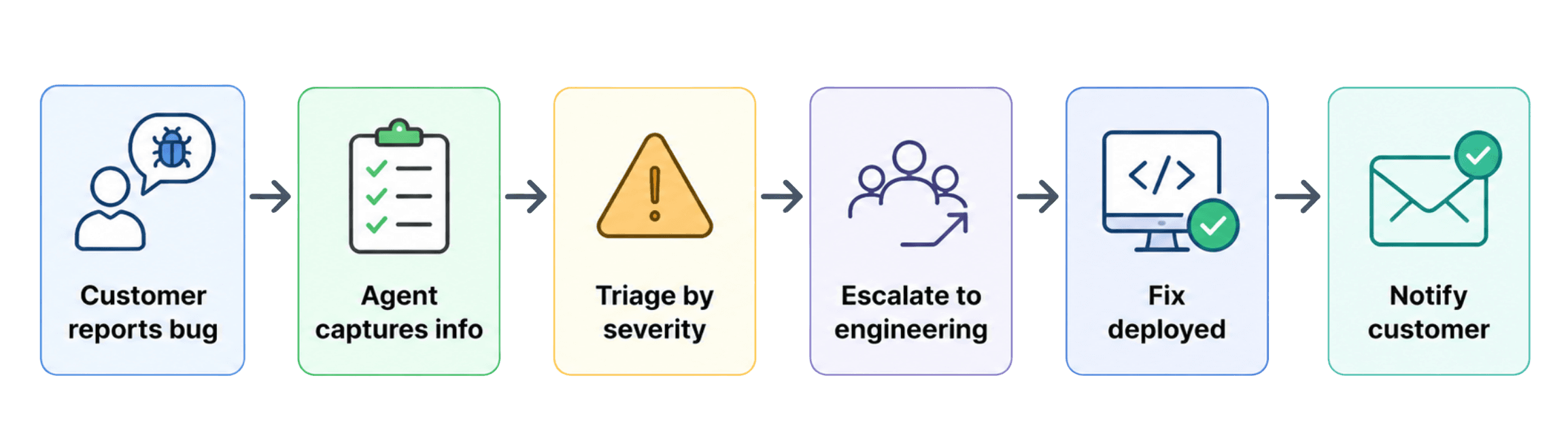
A good SOP answers five questions for every person on your team:
How do we capture bug reports consistently?
How do we triage by severity?
How do we escalate to engineering?
How do we keep the customer informed?
How do we close the loop when a fix is deployed?
Without answers to all five, your process has gaps. Gaps are where bugs get lost.
Step 1: Define What Counts as a Bug
This sounds obvious until the fourth time your team debates whether something is a bug or a feature request while the customer waits.
Before anything else, your SOP needs a clear definition:
A bug is any behaviour in your product that does not match the intended behaviour.
Examples:
A button that does not work as labelled → bug
A page that loads incorrectly on a specific browser → bug
A calculation that produces the wrong result → bug
A customer who wants a feature that does not exist → not a bug
Write this definition into your SOP and give your team two or three examples. Grey areas will still come up, but a written definition cuts the debate time significantly.
Step 2: Build a Severity Framework for Bug Reports
Not every bug is equally urgent. A broken checkout affecting all users is not the same as a minor UI misalignment on a settings page nobody uses. Treating them the same wastes engineering time and creates the wrong priorities.
A simple four tier severity framework works for most customer support teams:
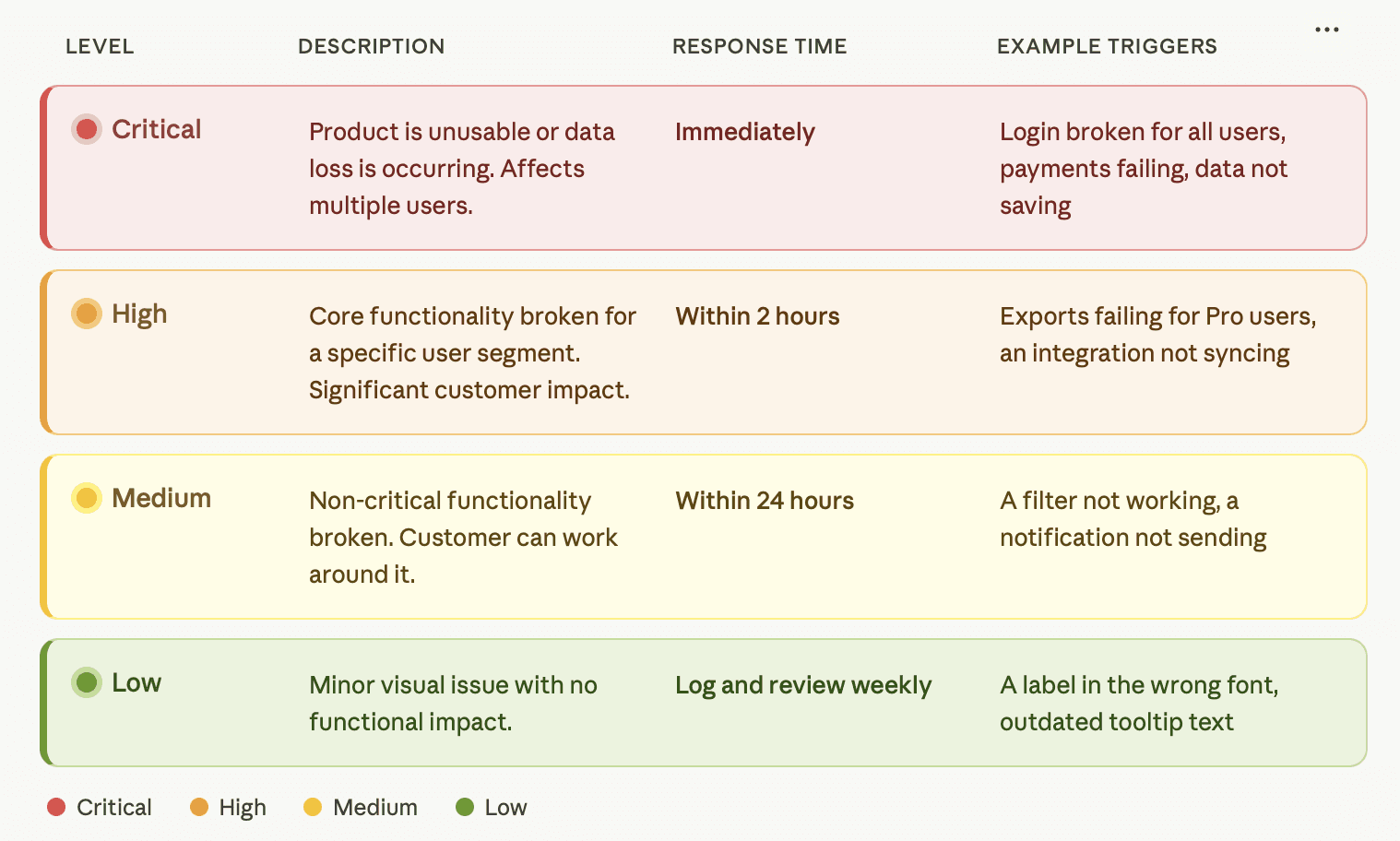
When agents can look up a severity level in 30 seconds, triage stops being a judgment call and starts being a lookup.
Step 3: Standardise How Bug Reports Are Captured
The information captured at the point of reporting determines how fast the bug gets fixed. Your SOP should define exactly what is required before a bug is escalated:
What the customer was trying to do
What they expected to happen
What actually happened, including exact error message text
Steps to reproduce the issue
Browser, OS, device and URL
Whether the issue happens every time or intermittently
How many customers are affected
A bug report without these fields should not move to engineering. It goes back to the agent to complete first.
The fastest way to capture complete information is to remove the burden from the customer entirely. Tools like Bugtrotter let customers record a short video of the issue in real time. Browser, OS, URL, and device are captured automatically. The report lands in your helpdesk with everything your developer needs without a single follow-up question.
Step 4: Create a Customer Support SOP Escalation Path
Your SOP needs to tell agents exactly who gets the bug and how it gets to them
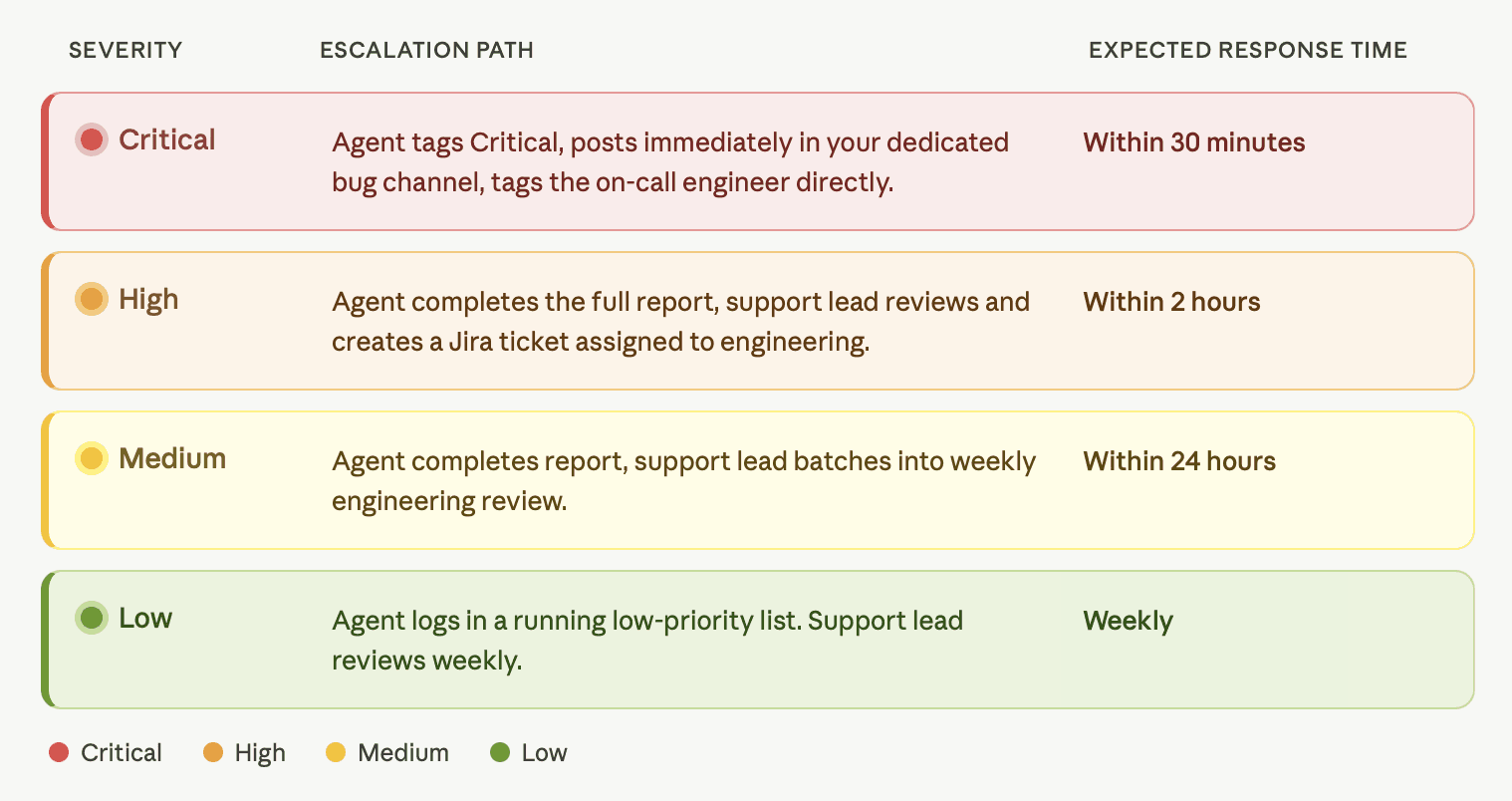
Write the actual names of channels, ticket systems, and team members into your SOP.
“Escalate to engineering” is not an escalation path.
“Post in #bug-reports in Slack and create a Jira ticket tagged Medium” is.
Step 5: Set Customer Communication Standards
Your SOP should tell agents exactly what to say and when at every stage:
On receipt: Acknowledge within your standard first reply time. Confirm you have what you need or ask for what is missing. Do not promise a fix time.
On escalation: Let the customer know the issue has been passed to engineering. Give a realistic timeframe based on severity.
On resolution: Notify the customer the moment the fix is deployed. A one line message “the issue you reported has been fixed, please let us know if you see anything further”, closes the loop and builds trust.
If the issue cannot be reproduced: Tell the customer honestly. Keep the ticket open for 14 days before closing.
Most support teams skip the resolution notification. It takes 30 seconds and has more impact on customer loyalty than almost anything else your team does.
Step 6: Review and Improve Monthly
An SOP that does not get updated stops being useful within six months. Your product changes. Your team changes. The bugs you see today will be different from the bugs you see in six months.
On the first Monday of every month, your support lead should spend 30 minutes asking four questions:
Which bug reports took the longest to resolve, and why?
Were there any escalation failures?
Are the severity definitions still accurate?
Has anything in the product changed that the SOP does not account for?
Update the SOP based on the answers and share the changes with the team.
What Your SOP Should Look Like in Practice
A bug report SOP does not need to be a 20-page document. A single Notion page with six sections works for most teams. Here is a simple layout:
Section | Owner | Review Cadence |
|---|---|---|
Bug definition | Support lead | Quarterly |
Severity framework | Support lead | Monthly |
Capture checklist | Support lead | Monthly |
Escalation path | Support lead + Engineering | Monthly |
Customer communication scripts | Support lead | Quarterly |
Review cadence | Support lead | Monthly |
Link your bug report templates directly from the capture checklist section.
Link your Slack channel and Jira project from the escalation section.
Make it something an agent can open and follow in real time, not a document they read once during onboarding and never look at again.
Conclusion
A customer support SOP for bug reports is not about adding bureaucracy to your process. It is about making sure every bug that comes in gets handled the same way, regardless of who is on shift, how experienced they are, or how vague the original message was.
Build it once. Update it monthly.
The teams that fix bugs fastest are not the ones reacting differently to every report. They are the ones with a clear process that removes the guesswork at every step.
If you want to improve the quality of reports coming into your SOP before agents even start working on them, read our guide on how to turn customer complaints into actionable bug reports.
View more articles
Learn actionable strategies, proven workflows, and tips from experts to help your product thrive.